Changelog
Version 2.1.0
August 21, 2026
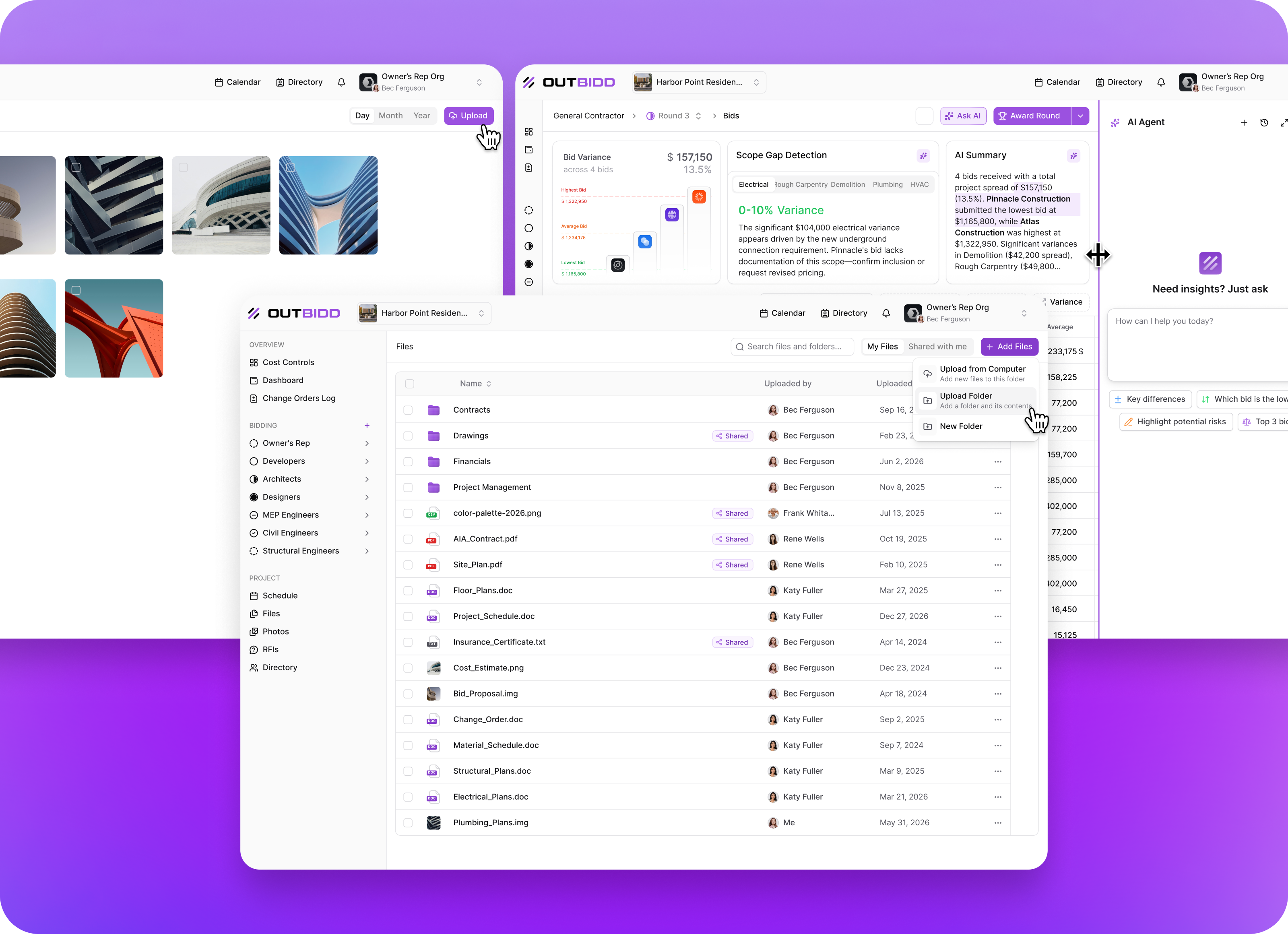
Under the Hood: Activity Tracking, a New Design System, and a Lot of Polish
Not every month is a headline feature.
Multi-vendor bidding shipped in July after two and a half months of building toward it. What we did in August was different. No single launch, but a lot of work that had to happen before the next set of features could. Activity tracking across the entire platform. A completely rebuilt design system. Cleanup on everything that came out of multi-vendor bidding. And a long list of smaller improvements that make the platform better to work in every day.
Here's everything that changed.
Activity Tracking Across the Platform
This is the biggest thing we built last month, and it's the one that makes the most difference going forward.
Outbidd now records activity across the entire platform. Every change to a budget. Every change to a bid. Every change order, every RFP, every RFI. All of it is captured, so there is a complete record of who did what and when it happened.
Why We Built It First
Activity tracking is a prerequisite. As we move into project financial information in a serious way, the record of what changed and who changed it stops being a nice-to-have and becomes a requirement. You cannot manage project financials responsibly without an audit trail behind them.
So we built the entire tracking layer first, ahead of the features that depend on it. You won't see activity feeds in the platform yet. What you will see is where they start showing up next month, alongside the first release of change order management. From there, we'll roll out activity feeds across the rest of the platform's features and existing functionality over the coming months.
The record is being kept as of now. Surfacing it everywhere it belongs is the work ahead.
A Rebuilt Design System
We migrated the entire interface onto a new component library. Buttons, inputs, tabs, filters, page layouts, and everything in between.
The platform already had a modern feel. This makes it tighter. Cleaner spacing, more consistency from page to page, and a more refined look across the board. If you have been in the platform for a while, you'll notice it immediately.
The part you won't see is just as important. A single, consistent component library means we can build and ship new screens far faster than we could before. Every screen we design from here starts with a complete set of pieces that already look and behave the way they should.
Access Control Cleanup and Stability
Multi-vendor bidding opened the platform up to every vendor type on a project, and once real customers started running bids out to architects, engineers, and consultants alongside their GCs, a handful of things needed tightening up.
We went through access control and permissions across all of it. Who sees what, at what point in the process, across every vendor type on a project. Everything has been cleaned up and everything is running the way it should.
Built for Bigger Screens
Several pages were capping their content with fixed heights and widths that made sense on a laptop and wasted a lot of room on anything larger. We revised those pages so they actually use the screen you're on.
If you work on a large display, and most of the people using Outbidd do, those pages feel considerably better now.
A Resizable Bid Analysis Agent
The Bid Analysis Agent builds tables, breakdowns, and comparisons as you ask it questions, and in a fixed panel some of that output was getting cut off.
You can now resize the agent. Make it substantially larger when you're working through a detailed comparison, shrink it down when you want more of the page, and set it wherever it works for the screen you're on.
Folder Uploads in the File Manager
You have always been able to upload files and drag and drop them into the file manager. Now you can upload entire folders.
Drop in a full drawing set, a folder of specs, or an addendum package with the structure already intact. No rebuilding folders one at a time to match what's on your desktop.
We also added photo uploads directly on the Photos page, so project photos go where they belong without a detour.
Addresses That Don't Exist Yet
Project addresses were fed entirely through Google Maps, which works right up until it doesn't. A lot of our customers are building brand new developments where the land has no address yet. The address quite literally does not exist, and there was no way to enter one.
Now there is. If an address isn't found, you can enter it manually. The same goes for PO boxes and anything else Google doesn't recognize. Ground-up development is a big part of what our customers do, and the platform should never be the reason a project can't get set up.
Why All of This Now
August was about getting things in order. Activity tracking had to exist before we could responsibly build project financials on top of it. The design system had to be rebuilt before we start shipping the volume of new screens the next few months call for. Access control had to be cleaned up now that every vendor type is running through the platform.
Some of this you'll feel the moment you log in. Some of it you won't see until the features it supports start landing.
None of this is the kind of work that makes for an exciting announcement. All of it makes the platform better to use today and makes what's coming next possible.
More very soon.
Ready to see it in action? Book a demo today or each out at [email protected].
Questions about these updates? Reach out to our support team. We're always here to help.
Version 2.0.0
July 17, 2026
.png)
Multi-Vendor Bidding Is Here
This is the one.
For the last two and a half months, nearly every feature we've shipped has been pointing toward this moment. The rebuilt RFP flow. The redesigned calendar and event timelines. The new file manager and file sharing. The redesigned bid submission experience. The dashboard overhauls. All of it was building toward this.
Today, multi-vendor bidding is live on Outbidd.
What This Means
From day one, Outbidd has been the best way to bid out to general contractors. That was always just the beginning. Starting today, you can run a fully digitized RFP to any vendor on your project. Any of them.
Architects. Engineers. Designers. FF&E. General Contractors. Special Inspectors. Subcontractors. Suppliers. Every Line Item.
If they're involved in the project, you can bid it out to them inside Outbidd. Create the RFP, manage the entire process, collect proposals, and then use our leveling tools to make sure you're selecting the best vendor across every single discipline on the project. Not just the best GC. The best team.
What We Built to Get Here
This wasn't a single feature we flipped a switch on. It's a culmination of everything we've shipped since May, all working together to make multi-vendor bidding possible at the level we wanted it to be.
A completely redesigned RFP flow that supports any vendor type with a full scope of work, structured line items, submission questions, and a dedicated event timeline built specifically for each RFP.
A rebuilt calendar and event structure that lets you filter by vendor type, assign events to specific RFPs, and manage complex multi-vendor timelines without losing track of anything.
A completely redesigned bid submission experience for all vendors with a tabbed single-page flow covering pricing, questions, qualifications, and supporting documents, alongside a rebuilt proposal extraction agent that pre-populates everything it can before a vendor ever has to type a thing.
A fully redesigned file manager with complete control over what gets shared internally and externally, automatic file sharing for active RFPs, and direct sharing with anyone regardless of whether they have an Outbidd account.
Redesigned dashboards across the entire platform that give owners, developers, retailers, and vendors a cleaner, more complete picture of everything happening across their projects.
All of it, built and shipped over the last two and a half months, specifically to make this moment possible.
Why This Matters
Ownership groups, developers, retailers, and owner's reps don't just hire GCs. They hire entire project teams. And until today, the tools to manage that process in a single platform didn't exist. Spreadsheets. Email chains. Disconnected systems. Proposals in different formats from every vendor, reviewed in different ways, tracked in different places.
That's over. Every vendor, every RFP, every proposal, every comparison. All of it inside Outbidd. All of it organized, leveled, and reviewed the way it should be.
We set out to build the best bidding platform for ownership groups. Multi-vendor bidding is us putting our stamp on exactly that.
What's Next
We're not done. Not even close. Our next most requested feature is already in the works and we couldn't be more excited about where this platform is headed.
More very soon.
This is better bidding.
Ready to see it in action? Book a demo today or each out at [email protected].
Questions about these updates? Reach out to our support team. We're always here to help.
Version 1.19.0
July 15, 2026

Every Dashboard, Redesigned
Before multi-vendor bidding ships, we wanted to make sure the foundation was right. That meant taking a hard look at every major dashboard across the platform and asking whether they were as clear, as readable, and as easy to work through as they needed to be. We've shipped a lot over the last six months and the dashboards hadn't kept up. That changes today.
This is the last major update before multi-vendor bidding rolls out. Here's everything that changed.
The Main Owner Dashboard
The main dashboard got the most significant overhaul. It's cleaner and simpler but also more complete than it has ever been. Here's what's new.
Portfolio-level metrics now live at the top of the page. Giving you a real high level pulse on your portfolio without having to dig for it.
We also introduced project financials to the dashboard for the first time. Budget versus actual spend, total percent committed, and buyout status for your most important projects. This is the beginning of a larger push toward total project financial tracking inside Outbidd, and we wanted to start surfacing that information where you can actually see it every time you log in.
The bid packages card has been completely revised. For every project you can now see every bid package, how many bidders are attached to each one, and a breakdown of where each package stands in the process.
We also replaced the old RFI card with something much more useful: a things that need your attention card. RFIs are still in there, but so is everything else that actually needs your eyes on it. Not enough bidders on an RFP. A bid that is about to close. Recent changes across a project. Anything important that needs action surfaces here so nothing slips through.
The Project Dashboard
The individual project dashboard has been cleaned up and updated to reflect everything the platform can now do. Revised financials, an updated view of bids flowing through the platform, and a clearer picture of what needs attention on that specific job. The cards that were already working well are still there. Everything else got brought up to speed.
The RFP Overview Page
This one got a complete redesign. The RFP overview page now gives vendors a full, well-organized picture of everything they need to know about an RFP the moment they open it.
You'll find the most important information first: bid due dates, recent RFIs, the scope of work, and upcoming milestones and events. Project documents also now front and center, tagged directly to the RFP they belong to.
The bid totals section has been revised so vendors can click directly into any part of their submission from here. Pricing, questions, qualifications, supporting documents. One click and you're exactly where you need to be.
We also added the ability for vendors to formally opt in or decline directly from the RFP overview page after they've had a chance to review everything. Ownership groups have always wanted a clearer picture of who is actually planning to bid. Now they have it.
The Vendor Dashboard
The vendor dashboard is getting the lightest touch of the four. Vendors have told us they like how clean and simple it is, and we agree. We kept what works and only updated what needed to change to stay consistent with everything else shipping alongside multi-vendor bidding. No unnecessary changes, no learning curve.
Why All of This Now
Multi-vendor bidding means more vendor types, more RFPs, and more moving pieces on every project. These dashboard updates make sure that complexity never becomes confusion. Whether you're an owner managing multiple RFPs across a portfolio or a vendor reviewing an invitation for the first time, everything is easier to understand and faster to act on than it has ever been.
Multi-vendor bidding ships alongside these updates. Everything is ready.
This is better bidding.
Ready to see it in action? Book a demo today or each out at [email protected].
Questions about these updates? Reach out to our support team. We're always here to help.
Version 1.18.0
July 10, 2026

RFP File Sharing, Done Right
Alongside the file manager rebuild, we completely changed how files are selected, organized, and shared inside the RFP workflow. This is the part that ties everything together.
A Dedicated File Selection Page in Every RFP
Inside the RFP workflow, there is now a dedicated page where you build out exactly what you're sharing with each vendor. Select individual files, entire folders, photos, whatever is relevant to that specific RFP. What you select is what gets shared. Nothing more.
Folders That Stay in Sync Automatically
Here's where it gets really powerful. If you share a folder inside one RFP or multiple RFPs, any file added to that folder, whether from the RFP page or from the file manager automatically gets shared with whoever's in those RFPs.
What that means in practice: say a project is already out to bid and the architect issues an addendum set of drawings. Upload the addendum to the shared folder and it immediately goes out to every vendor on those RFPs. No manual resharing. No digging back into the RFP to update what's included. It just happens.
Why This Matters
Addenda and revised drawings have always been a pain point in the bidding process. Someone uploads a new set, forgets to send it to one bidder, and suddenly you have Vendors pricing off different documents. That's exactly how scope gaps and change orders start. This eliminates that risk entirely by making file sharing in active RFPs automatic the moment something new is added to a shared folder.
The Full Picture
Combined with the file manager rebuild, this gives you something that hasn't existed before on a bidding platform. A single centralized place for every project file, complete control over what gets shared and with whom, and an RFP workflow that keeps every bidder automatically up to date as the project evolves.
Everything organized. Everything controlled. Nothing missed.
Ready to see it in action? Book a demo today or each out at [email protected].
Questions about these updates? Reach out to our support team. We're always here to help.
Version 1.17.0
July 10, 2026
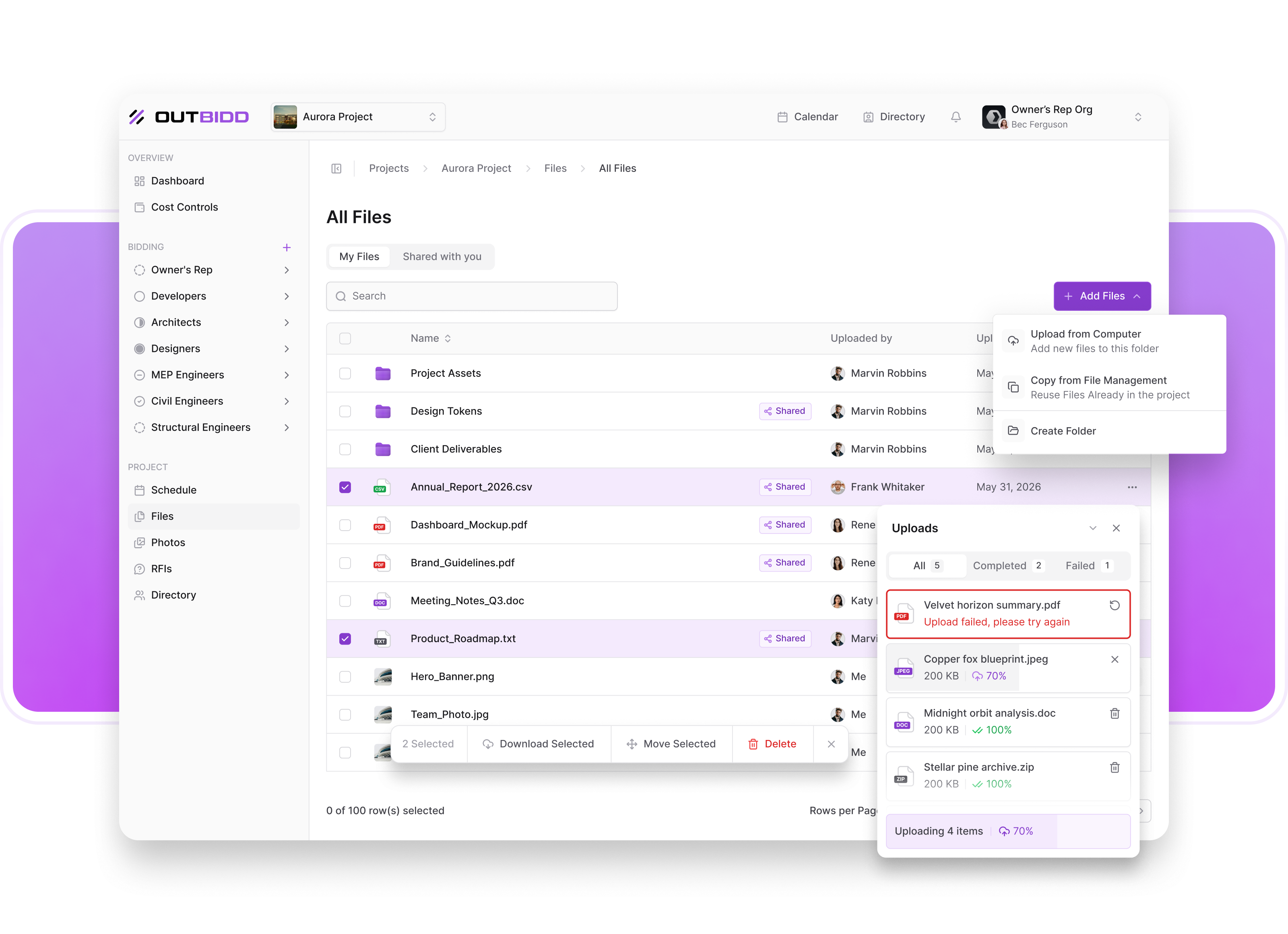
Your File Manager, Rebuilt
We redesigned the file management system from the ground up. Everything that made it useful before is still there. But now it works the way a modern project file system should — flexible, organized, and built around the reality that not every file on a project is meant for everyone on a project.
One Place for Everything
The file manager is now your central hub for every file on the project. Plans, specs, photos, budgets, LOIs, internal notes, vendor documents — all of it lives here.
Every file you add can be kept internal or shared externally with vendors, bidders, or anyone else involved in the project. You decide. Nothing gets shared unless you want it to.
Internal vs. External, Finally Separated
This is the change that matters most for how you actually use the platform day to day. Budgets, LOIs, internal memos, anything related to a project that you want to keep close — all of it can now live in the file manager alongside your shareable project documents without any risk of it ending up somewhere it shouldn't. Keep everything organized in one place. Control exactly what leaves it.
Think of it the way you think about Google Drive or Sharepoint. Everything is in one system. What you share, with whom, and when is entirely up to you.
Ready to see it in action? Book a demo today or each out at [email protected].
Questions about these updates? Reach out to our support team. We're always here to help.
Version 1.16.0
June 29, 2026
.png)
The Bid Submission Experience, Completely Reimagined
This is the biggest change to the vendor bidding experience since we launched. A fully redesigned bid flow, a completely rebuilt extraction agent, and a submission process so smooth that most vendors will never have to type a single thing themselves. Here's everything that changed.
A Brand New Bid Package Page
The bid package page is now a clean, tabbed, single-page experience with four dedicated sections:
Pricing — The bid form where vendors enter their numbers, including any breakouts and alternates. For GCs this is the same structured bid form you're used to. For all other vendor types coming soon with multi-vendor bidding, this is where their pricing lives too.
Questions — Any questions the ownership group asked as part of the RFP are here. Vendors answer them in one place without ever leaving the page or opening a modal.
Qualifications — Dedicated space for clarifications and exclusions that apply to the bid as a whole. Not tied to a specific line item, not buried somewhere in a notes field. Their own tab, given the attention they deserve.
Supporting Documents — Vendors can upload as many supporting documents as they want to accompany their bid package. Everything in one place, no separate uploads, no back and forth.
The bid total and bid package progress is now prominently displayed with a clear click-through so vendors can review everything before they submit. No surprises at the end.
The Proposal Extraction Agent, Rebuilt
This is the part we're most excited about.
Vendors upload their proposal or bid document and our extraction agent goes to work. It reads through everything and pre-populates as much of the bid package as it possibly can. Pricing pulled and matched to the right line items. Questions answered based on what's in the proposal. Clarifications and exclusions identified and dropped into the right place automatically.
This isn't completely new. GCs have been able to upload their bid and have it extracted for a while now. What's new is two things. First, the agent now also answers the submission questions that ownership groups ask as part of the RFP. If the answer is in the document, it finds it and fills it in. Second, we rebuilt the agent with built-in redundancies to ensure accuracy before anything ever gets pre-populated. If it isn't confident in an extraction, it checks itself before filling it in. What lands on the page has been verified, not just guessed at. Anything it can't fill out with confidence gets flagged so the vendor can handle it before submitting.
The vendor reviews everything, confirms it looks right, and hits submit. That's the entire process. Most of the time without typing a single thing.
You Can't Miss It Anymore
We also made it unmistakably clear that uploading your proposal is the first thing you should do when you land on the bid page. The upload option is no longer a small button in the corner. It's a large purple drop zone front and center on the page. Drag your file in, drop it, and let the agent take it from there. Simple and obvious from the moment you arrive.
What This Sets Up
This redesigned bid flow is live for all general contractors right now. And there is no more hiding it, within the next week, when multi-vendor bidding ships, it becomes the standard submission experience for every vendor type on the platform. Architects, engineers, suppliers, consultants — every vendor who receives an RFP through Outbidd will submit through this same flow.
Upload your proposal. We handle the rest. Review, confirm, submit.
That's it. That's bidding on Outbidd.
Ready to see it in action? Book a demo today or each out at [email protected].
Questions about these updates? Reach out to our support team. We're always here to help.
Version 1.15.0
June 23, 2026
.png)
Your RFP Now Has a Timeline
This one is a natural extension of the calendar updates shipping alongside it, and it changes how you build out your RFPs in a meaningful way.
Up until now, the way events got connected to an RFP was straightforward: add them to the calendar, associate them with a vendor, send out to bid. Simple enough when you have one vendor type. As we expand to multiple vendors and multiple RFPs on the same project, we wanted to give you a better way to build and visualize the timeline for each RFP specifically.
Introducing the Events Tab on the RFP Page
There is now an Events tab on every RFP page. Inside, you'll find a timeline view of the project alongside every event currently on your project calendar.
Building your RFP timeline is as simple as dragging and dropping events from your project calendar into the RFP timeline. Want to include the site walkthrough and the bid due date for this specific RFP? Drag them in. Want to leave out events that don't apply to this vendor? Leave them out. Each RFP gets its own timeline, built exactly the way you want it.
Why This Matters
Different vendors on the same project are working on different schedules with different milestones. An architect's timeline looks nothing like a GC's timeline. Now each RFP reflects exactly what that vendor needs to know, and nothing they don't.
Clean timelines. Clear expectations. No crossed wires between vendor types.
More coming soon....very soon.
Ready to see it in action? Book a demo today or each out at [email protected].
Questions about these updates? Reach out to our support team. We're always here to help.
Version 1.14.0
June 22, 2026
.png)
The Calendar Just Got a Lot Smarter
As we add more vendor types to the platform, keeping track of what's happening, when it's happening, and who it's happening for gets more complex fast. These calendar updates make sure that complexity never becomes confusion.
Filter by Vendor Type
Inside any project calendar, you can now filter events by vendor type. Architect, engineer, GC, supplier, whoever is on the project — see just their timeline or see everyone's at once. Your choice.
Filter by Project in the Main Calendar
In the platform-wide calendar, you can now filter by project. Jump between projects, focus on one at a time, or see everything across your portfolio. However you prefer to work, the calendar keeps up.
Assign Events to Specific RFPs
When you add an event, you now assign it to a specific RFP, not just a vendor type. If you have multiple RFPs going out to different vendors on the same project, you decide exactly which RFP each event belongs to. Clean, clear, and built for the multi-vendor world we're moving into.
A Better Way to Define Event Types
We used to ask you to categorize events by type: bid due date, RFI due date, site walkthrough, and so on. We've replaced that with something more useful. Now you specify what phase of the project the event belongs to: design, bidding, construction, whatever phase it falls in. Then you name the milestone yourself. More flexibility, better organization, and a clearer picture of where each event lives in the life of the project.
Ready to see it in action? Book a demo today or each out at [email protected].
Questions about these updates? Reach out to our support team. We're always here to help.
Version 1.13.0
May 31, 2026
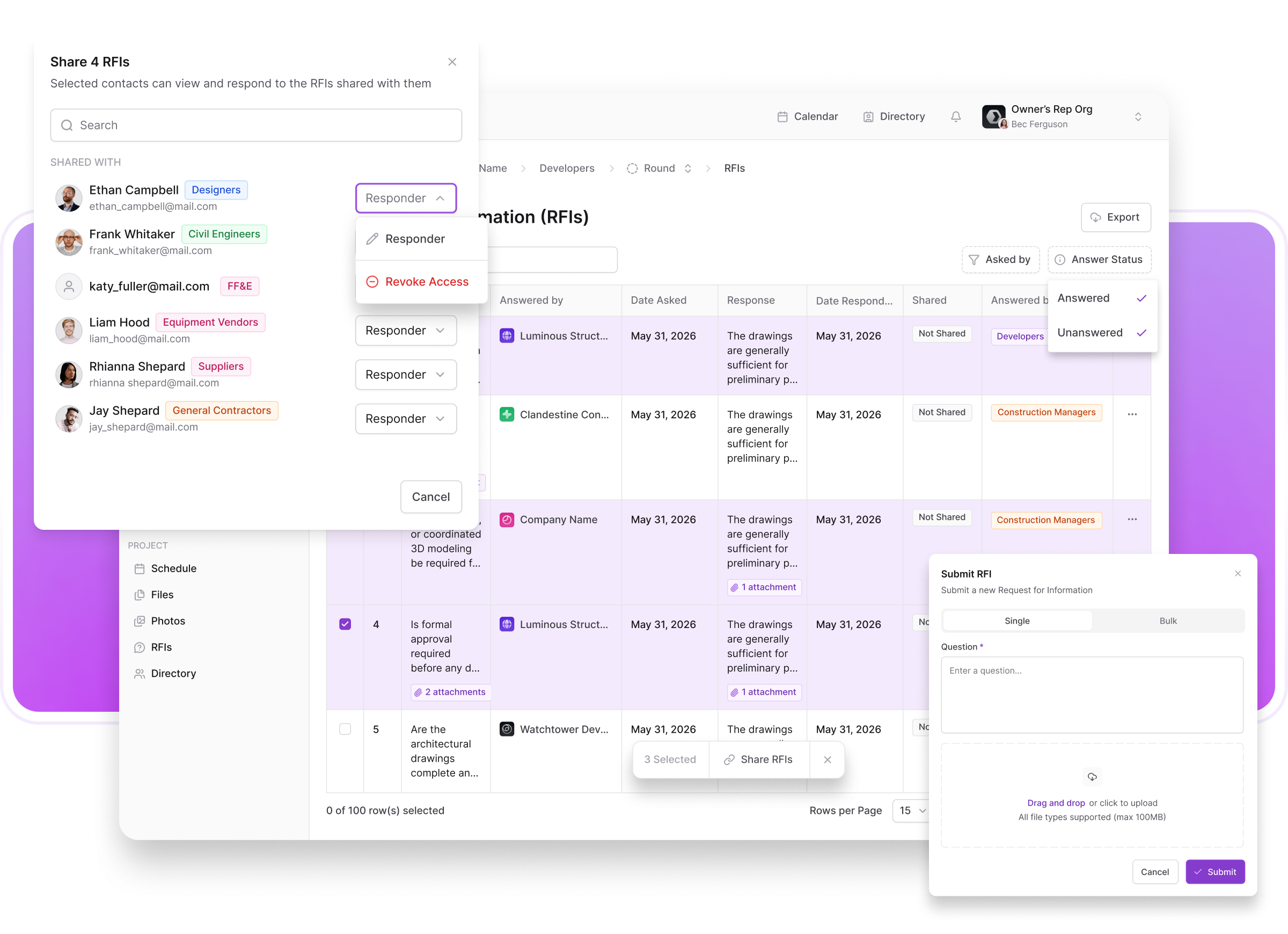
RFI Management, Tightened Up
Two updates to RFIs this week. One for GCs, one for owners. Both fix real friction points that have been slowing the process down.
For General Contractors: Bulk RFI Upload
Here's a scenario that happens constantly. A subcontractor sends a GC a list of ten questions. Or the GC sits down and works through a set of drawings and comes up with fifteen questions of their own. Either way, they're staring at a list and manually entering each question one at a time.
Not anymore. GCs can now upload all of their RFIs at once. We parse the list and create each question as its own separate RFI inside the platform, ready to be answered individually. Ten questions become ten RFIs in seconds. Twenty questions, same thing. However many you have, upload them all at once and let the platform do the rest.
For Owners and Reps: RFI Sharing Visibility
Owners have been able to share RFIs with architects, engineers, and other consultants for a while now. What wasn't clear was what happened after you hit share. Which RFIs were shared? With whom? If you had multiple consultants responsible for different questions, there was no easy way to see who had what without digging.
That's fixed. You can now see exactly which RFIs have been shared and who each one was shared with. At a glance, you know who is responsible for answering what and who has access to which questions. No more wondering if your structural engineer actually received that question about the foundation detail. It's right there.
Why It Matters
RFIs move at the speed of whoever is slowest in the process. Bulk uploads remove a bottleneck on the GC side. Sharing visibility removes a blind spot on the ownership side. Together they make the whole RFI process faster and a lot easier to manage from both ends.
Ready to see it in action? Book a demo today or each out at [email protected].
Questions about these updates? Reach out to our support team. We're always here to help.
Version 1.12.0
May 21, 2026
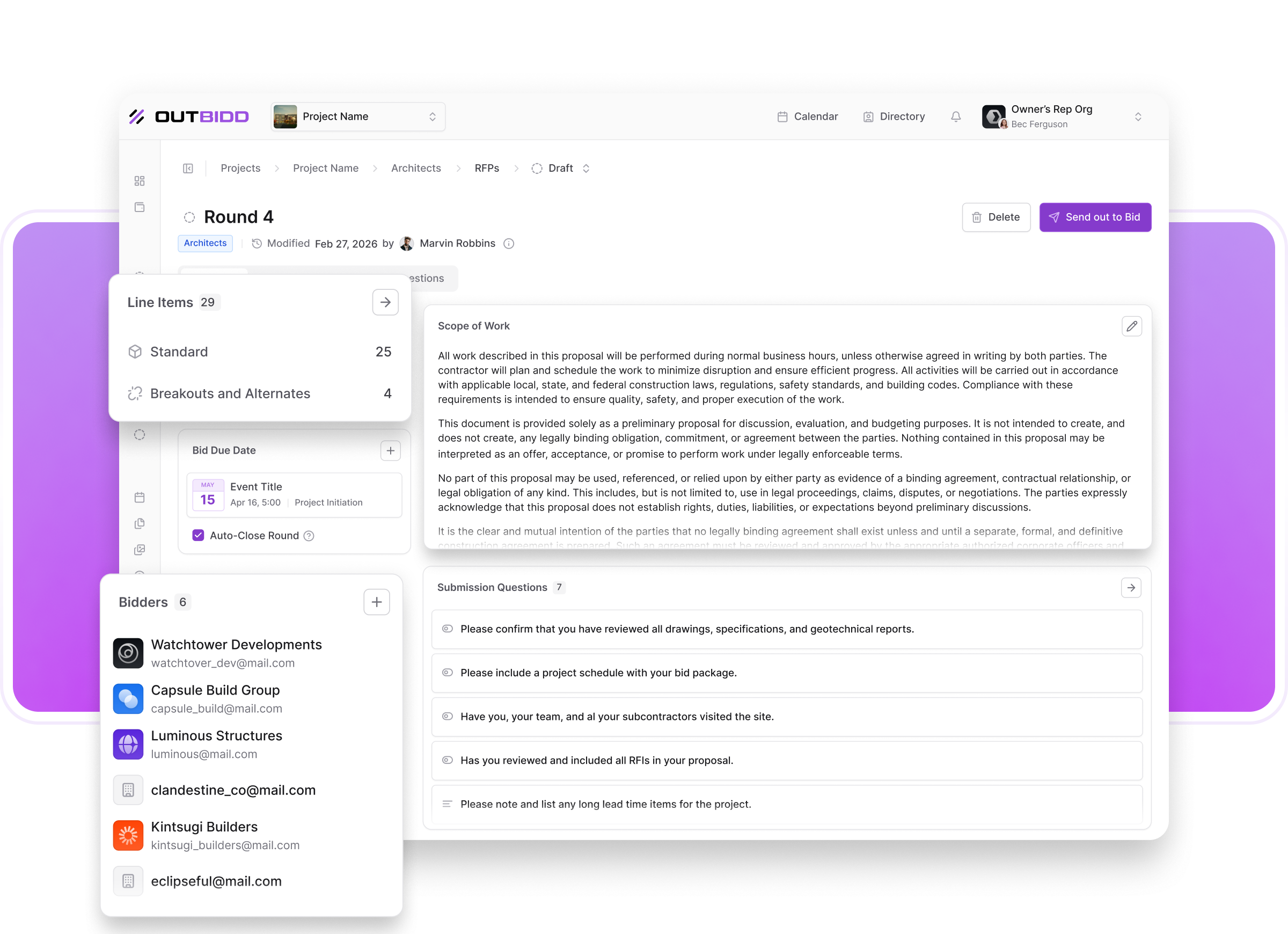
The New RFP Flow
A few weeks ago we updated the navigation and told you that "General Contractor" becoming its own section wasn't just a rename, it was a signal of where we're headed. This is the next step heading toward that new direction.
We just rebuilt the send out to bid flow from the ground up. The old multi-step wizard is gone. In its place is a clean, multi-page RFP setup that finally does what a real RFP is supposed to do....give your contractors everything they need to know about the project, all in one place, without you having to build a 10-page PDF document ever again to do it.
What's New
Scope of Work
The biggest addition. You can now write and include a full Scope of Work directly inside the RFP. Your line items tell contractors what to price. Your Scope of Work tells them how to do it, what the expectations are, and what the project actually involves. That context has always mattered. Now it lives where it belongs, right alongside everything else you're sending them.
A Simpler, Cleaner Flow
The wizard is out. The new setup is a straightforward multi-page layout that's faster to work through and easier to understand at a glance. Your line items, your bidders, your submission questions, your key dates, your files, and now your Scope of Work — all organized clearly, all in one complete RFP.
What This Means
The Word document RFP had a good run. But creating a separate document, formatting it, emailing it alongside your bid form, hoping GCs read it, and then managing questions about information that should have been obvious from the start — that entire process is now unnecessary.
Your RFP lives in Outbidd. Your GCs access it the moment they open the project. Everything you need to communicate is already there before they ask.
This is a complete digital RFP. And it's only going to get more powerful from here.
More coming soon.
Ready to see it in action? Book a demo today or each out at [email protected].
Questions about these updates? Reach out to our support team. We're always here to help.
Version 1.11.0
May 6, 2026
.png)
A Navigation Built for What's Coming
We've been working on something for a while now that is our most requested feature by far. And when we looked at the platform navigaiton, it told the old story, not the new one. So we changed it.
On the surface, this update is about organization. The sidebar is now grouped into clear sections. Bid Forms, RFIs, and Bid Review are nested and easy to find. The overall structure is cleaner and faster to move through.
But the more meaningful change is one you might not notice right away.
"Bids" is now "General Contractor."
That's not just a rename. It's a signal. The current platform is built around bidding to just your GC. One vendor type. One bidding lane. That worked for where we started. It's not where we're going.
General Contractor is now its own distinct section because soon it won't be the only one...
Ready to see it in action? Book a demo today or each out at [email protected].
Questions about these updates? Reach out to our support team. We're always here to help.
Version 1.10.0
April 28, 2026
.png)
Meet Your Bid Analysis Agent
We've been building to this one for a while.
Since day one, Outbidd has been about giving owners, developers, and reps, the tools to actually understand what's in front of them when bids come in. Scope gap detection. AI summaries. Line item leveling. Variance detection. Every feature we've shipped has been a step toward the same goal: stop guessing, start knowing.
This is the biggest step we've taken yet.
Introducing the Bid Analysis Agent
You'll see it when you open your Bid Review page. A glowing button in the top right corner. Click it, and you're in.
The Bid Analysis Agent is a fully agentic AI chat experience with complete access to everything across your project and RFP. Not summaries. Not snippets. Everything.
Project files. RFIs and their responses. Bid packages across every bidder. Bid documents, clarifications, and exclusions. Submission questions and responses. Every bid round you've run, whether that's two or eight.
Budget round. Schematic Design. Design Development. Construction Documents. All of it. All at once. All instantly available the moment you ask.
Ask It Anything
This isn't a dashboard with pre-built charts. It's a conversation with an agent that actually knows your project.
Want to know why the concrete number jumped from $200K in round one to $350K in round five? Ask it. Want a breakdown of every scope gap across all active bidders? Ask it. Want to know which GC has the most exclusions and what they're excluding? Ask it. Want a list of pointed questions to bring back to each contractor before you make your selection? Ask it.
If it's in the project or in the bid packages, you now have access to it immediately. No more reading through hundreds of pages of bid documents to find one answer. No more piecing together what changed between rounds from memory and a spreadsheet. No more wondering whether you caught everything before you make a million dollar decision.
You ask. It answers. Instantly.
What This Changes
There has always been a gap between the data that exists in a bid and the knowledge you actually walk away with after reviewing it. Owners and reps who are good at this job have spent years developing the instincts to know what questions to ask, what to look for, and where to dig. That expertise is real and it matters.
What the Bid Analysis Agent does is give those instincts more to work with than any human could process alone. Catch scope gaps you would have caught anyway, faster. Catch the ones you might have missed entirely. Understand not just who is high and who is low, but why. Walk into every contractor conversation with better questions and a clearer picture of what you're actually comparing.
This is what reviewing bids should feel like.
The Bottom Line
We've always believed there's no better way to bid and level general contractor bids than through Outbidd. Version 2.0 makes that case harder to argue with than ever.
Answers instantly. Insights immediately. Nothing left on the table.
This is better bidding.
Ready to see it in action? Book a demo today or each out at [email protected].
Questions about these updates? Reach out to our support team. We're always here to help.
Version 1.9.0
April 10, 2026

Change Orders Finally Have a Home
Change orders are a fact of life in construction. The millwork vendor needs extra work. The GC finds something behind the wall that wasn't on the drawings. The architect adds a scope item mid-project. It happens on every job. The question has never been whether change orders will come up — it's whether you can track them before they sneak up on you.
Until now, that tracking usually lived in a separate spreadsheet, a folder of PDFs, or somewhere in an email chain you'd have to dig through when someone asked where the budget stood. Not anymore.
What's New: Change Order Tracking in Cost Controls
You can now log change orders directly on the Cost Controls page, tied to the specific line items they affect. For each change order you can add:
- A title
- A description of the work
- The amount
- The attachment you received from the vendor
Once logged, the change order amount is automatically included in the total commitments for the project. Your cost overview updates in real time, so you always know exactly where the project stands financially without having to do any manual math or cross-reference a separate tracker.
Why This Matters
Change orders are where projects quietly go over budget. Not all at once, but one line item at a time. A $3,000 addition here, a $12,000 scope change there, and suddenly you're $80,000 over before anyone put it all together in one place. This gives you that one place. Every change order, every line item, every attachment, all feeding directly into your total project cost in real time.
Complete financial visibility from award through closeout. This is what Cost Controls was always meant to be and this is our next step towards this.
Ready to see it in action? Book a demo today or each out at [email protected].
Questions about these updates? Reach out to our support team. We're always here to help.
Version 1.8.0
April 6, 2026
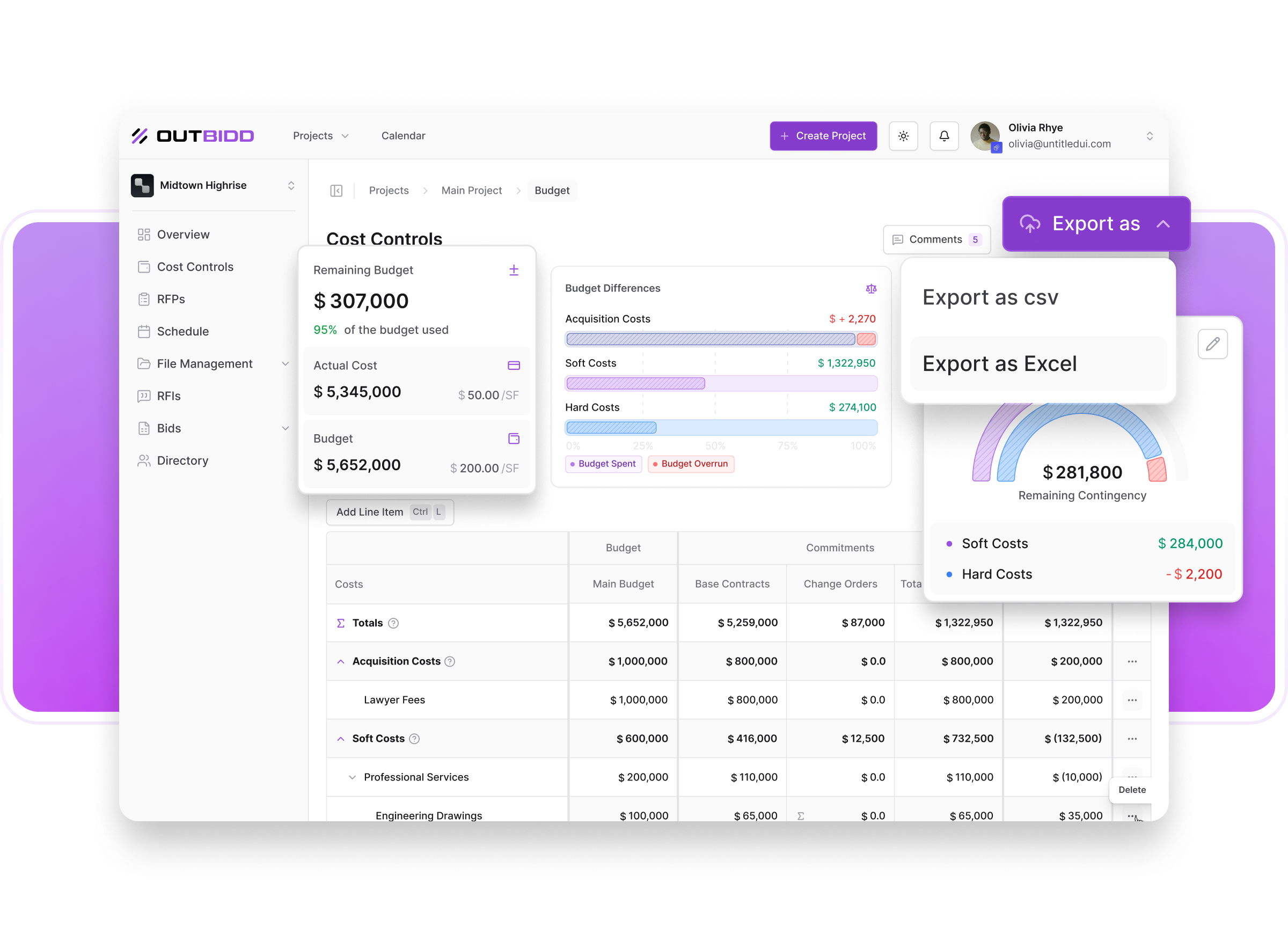
Your Data, Your Spreadsheet
We know you're not living entirely inside Outbidd. You've got stakeholders who want things in their inbox. Clients who want a spreadsheet. Board members who definitely aren't logging into another platform. Today we made it a whole lot easier to get your data out and into whatever format you need it.
What's New: Table Exports
You can now export five tables across the platform directly to CSV or Excel with one click. Combined with the RFI export that was already available, that brings the total to six pages with full export capability.
The new exports:
- Cost Controls
- Bid Review
- Individual GC Bids
- Bid Forms (Owner side)
- Bid Forms (GC side)
Why It Matters
Outbidd handles your bid management. But the conversations around that data happen everywhere else. In client meetings, ownership reviews, budget presentations, and internal reports. Now instead of screenshotting tables or manually rebuilding data in a spreadsheet, you pull it straight from the platform in seconds and walk into those conversations prepared.Clean data, right format, no extra steps.
Ready to see it in action? Book a demo today or each out at [email protected].
Questions about these updates? Reach out to our support team. We're always here to help.
Version 1.7.0
March 25, 2026
.png)
Upload Your Bid. We'll Handle the Rest.
This one has been on our minds for a while. And we think you're going to love it.
If you've ever been on the GC side of a bid, you know the frustration. You spend days putting together your bid in your own format, getting every number right, writing up your clarifications, nailing your exclusions. Then you open the owner's bid form and realize you have to enter all of it again, line by line, into their spreadsheet. Or in our case, into our platform. Your number is already in your bid. Now you're just retyping it somewhere else.
It's one of those things everyone has quietly accepted as just part of the process. We decided to fix it.
Introducing the Best of Both Worlds
Owners still create their bid forms inside Outbidd. That part doesn't change. Owners still want to review bids in a consistent format that makes comparison easy, and that's completely fair. Standardized bid review makes comparison easier.
But now, instead of GCs manually filling out each line item one by one, they can simply upload their bid in PDF or Excel format and let us do the work.
Outbidd reads through the uploaded file and automatically extracts and matches everything to the bid form:
- Line item costs
- Descriptions of what's included
- ClarificationsExclusions
- All of it, mapped to the right line items on the form, automatically.
GCs then review what was extracted, make sure everything looks right, and submit. That's it.
Why This Is a Big Deal
For GCs, manually re-entering bid data wasn't just tedious, it was a source of errors and quite frankly a waste of time. Numbers transposed, line items missed, clarifications left out because there wasn't an obvious place to put them. Now your bid goes in the way you built it, and the platform takes care of the translation.
For owners and owner's reps, nothing changes about how you review bids. You still get a clean, standardized bid form filled out exactly the way you want to see it. You're just getting it faster, with fewer errors, and with more complete information than before.
Everyone wins. GCs save hours of redundant data entry. Owners get cleaner, more complete bids. And the whole submission process moves faster for everyone involved.
What This Means for the Platform
This is one of those features that changes how both sides of the platform feel. Bidding has always meant a tradeoff between what's easy for the person submitting and what's useful for the person reviewing. We just eliminated that tradeoff. GC Bid submission through Outbidd just became easier than sending an email.
Better bids. Less work. Faster submissions. This is what we built Outbidd to do.
Ready to see it in action? Book a demo today or each out at [email protected].
Questions about these updates? Reach out to our support team. We're always here to help.
Version 1.6.0
March 13, 2026

The GC Bid Experience, Rebuilt from the Ground Up
GCs have always been the other half of this platform. And as we've learned more about how they actually use it, we saw a real opportunity to make their side of the experience significantly better. We redesigned the entire GC bid page, added pre-submission steps, gave contractors a dedicated place for their clarifications and exclusions, and completely rethought how you review what they send in. Here's everything that changed.
What's New: The GC Bid Page
Pre-Submission Steps
Before GCs submit their bid, they can now move through a structured pre-submission process. This gives them a clear checklist to review and answer questions before hitting submit, so nothing gets left out and you get cleaner, more complete submissions on the first pass. No more vague bids where you're not sure if they missed something or just didn't include it.
File Uploads Before You're Ready to Submit
GCs have always been able to upload project files as part of their bid package. Now they can do it while they're still working on the bid, before they ever get to the submission flow. Schedules, site plans, logistics plans, insurance certificates, whatever you need — upload them as you go, not just at the finish line. One less thing to think about when you're ready to submit.
Dedicated Clarifications and Exclusions
This one is big as was an oversight in our oringal design. Not every clarification belongs to a specific line item. If a GC has a note that applies to the whole job, they now have a standalone section specifically for clarifications and exclusions. They're not shoehorning project-wide notes into a concrete line item anymore. You get cleaner submissions, they get a logical place to put the information, and nothing falls through the cracks because it didn't fit neatly into a cost code.
Redesigned Bid Page and Submit Flow
We rebuilt the bid page layout to incorporate all of these new additions in a way that flows naturally from start to finish. The step-by-step submission modal got a full redesign as well — same structured flow GCs are used to, just cleaner and a lot better looking.
What's New: The Bid Package Review Page
The owner and owner's rep individual GC bid review page is now a two-screen experience. We separated the overview from the detail, and the difference is significant.
Screen One: The Overview
The first page gives you the full picture at a glance:
- The estimate vs. the bid
- Price per square foot
- How the bid compares to the budget
- All files uploaded in the bid package
- Clarifications and exclusions
- Submission questions and responses
You can get a complete read on a contractor's bid without ever leaving this page.
Screen Two: The Bid Breakdown
The full line item breakdown lives on its own page now. Every cost code, every line item, everything included in each one. Separating this from the overview means you can focus on the details without losing the thread of the big picture. Easier to read, easier to review, and a lot easier to share with your team or clients.
What This Means for You
For CMs and Owner's Reps: You're getting cleaner bids, more complete submissions, and a review experience that finally matches how you actually think about contractor pricing.
For General Contractors: You have a structured, professional submission process with room for your whole bid, not just the line items.
Ready to see it in action? Book a demo today or each out at [email protected].
Questions about these updates? Reach out to our support team. We're always here to help.
Version 1.5.0
March 11, 2026
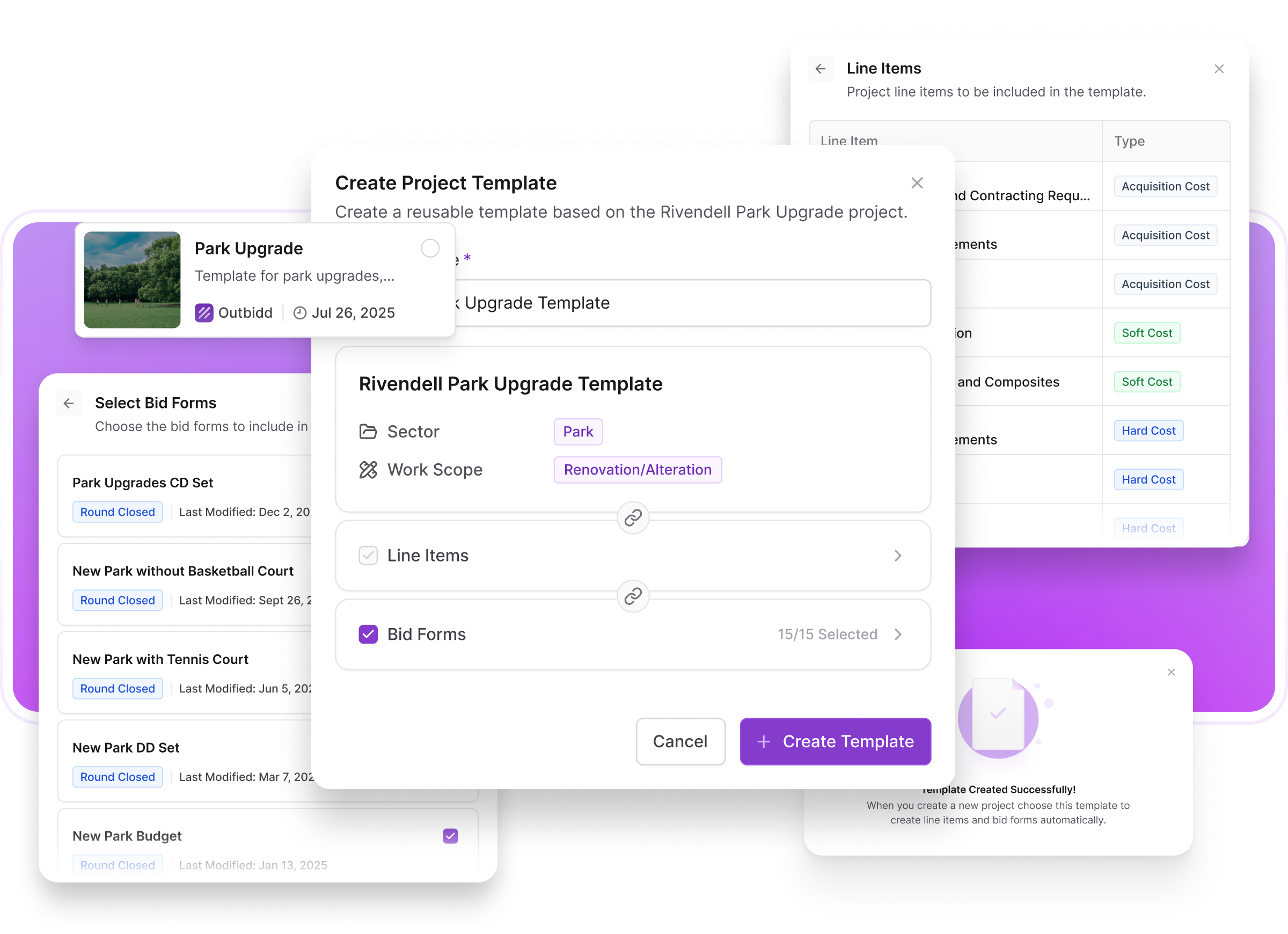
Project Templates: Stop Building from Scratch
If you're managing your 47th retail store buildout and still manually starting from scratch on every new project, we have good news. Actually, we have great news.
The Problem: Groundhog Day Projects
You know the scenario. You're building another location for the same retail chain. Same store layout. Same finishes. Same general scope. But when you create the project in your system? You're starting from absolute zero. Again. Manually re-entering every cost code. Rebuilding your bid forms. Reconfiguring submission requirements. Setting up the same project structure you've set up dozens of times before. And here's the thing: repetition isn't just tedious. It's risky. The more times you manually recreate the same setup, the more opportunities you have to miss something or set it up slightly differently than the last project.
What's New: Project Templates
We just launched Project Templates, and they work exactly how you'd hope they would.
Create Templates From Real Projects
Turn any existing project into a reusable template with one click. All the setup work you did on that successful project? Now it's a starting point for every similar project going forward.
What Gets Saved:
Cost Controls & Line Items — Every cost code, line item, and category from your cost controls page copies over automatically. No more rebuilding your project financial structure from scratch.
Bid Forms — All your custom bid forms from the last project save with the template.
How It Works
1. Pick Your Source Project
Choose a completed (or current) project that represents the type of work you want to template. Your most recent store buildout, for example.
2. Create the Template
Click "Create Template" and select what information you would like to include in this new project template.
3. Launch New Projects
When you start a new project, select your template. All that saved information loads instantly. Now you're customizing and refining instead of building from zero.
4. Customize as Needed
Templates give you a head start, not a straitjacket. Add, remove, or modify anything for the specific project. The template is your starting point, not your limitation.
What This Means for Different Users
Retail Chains & Restaurant Groups
You're building the same prototype over and over. Templates turn a 45-minute project setup into a 5-minute customization. When you're managing 20+ locations a year, that time adds up fast.
Developers with Recurring Project Types
Multi-family projects. Office renovations. Ground-up retail. Whatever your specialty, you probably have 3-5 project types you repeat constantly. Now each type gets its own template.
Construction Managers
If you specialize in certain sectors (healthcare, education, industrial), you can maintain proven project structures that reflect best practices and lessons learned from past work.
Real Impact
Let's talk numbers. Setting up a new retail project from scratch—entering cost codes, building bid forms, configuring requirements—typically takes 30-60 minutes of focused work. With templates? 5-10 minutes of customization.
If you're managing 20 similar projects a year, you just saved 10-18 hours. That's more than two full workdays you can spend on actual project management instead of administrative setup.
And it's not just about time. It's about consistency. When every project starts from the same proven template, you reduce variation, minimize setup errors, and ensure nothing gets missed because you're tired of typing the same information for the 30th time.
The Bottom Line
If you're building similar projects repeatedly, templates are about to become your favorite feature. Less setup time, more consistency, and a foundation for even more automation down the road.
Ready to see it in action? Book a demo today or each out at [email protected].
Questions about these updates? Reach out to our support team. We're always here to help.
Version 1.4.0
February 10, 2026
.png)
Cost Controls: Complete Financial Project Oversight Is Here
Real-Time Budget vs. Actuals
See exactly where every dollar goes as it happens. Track budgets against base contracts and total commitments across acquisition costs, soft costs, and hard costs. Visual indicators show you immediately what's on track and what's bleeding. No more waiting for monthly reports to find out you're $200K over.
Hierarchical Cost Structure Across the Platform
We rebuilt how Outbidd handles cost data from the ground up. The new tree structure lets you see big-picture totals (Electrical: $500K) while drilling into granular line items (Lighting fixtures: $125K, Power distribution: $85K). This hierarchy is now consistent everywhere - Cost Controls, bidding, project overview - so your team is always looking at the same structure.
Budget Card Redesigned
The project dashboard now shows budget performance at a glance. Percentage variance, visual indicators, and actual vs. budget comparison tell you immediately if the project is on track or headed for trouble.
Track Commitments and Contingencies
See exactly what you've committed versus what you budgeted. Monitor contingency draw-down in real time. Know your remaining budget before making the next spend decision, not after.
Why This Changes Everything
Construction projects fail financially because information comes too late. By the time you realize you're over budget, you're already dealing with the consequences. Cost Controls gives you the visibility to catch problems early, make informed decisions, and keep projects on track.
This is Outbidd evolving into the complete owner's rep platform - budget oversight, bid management, and project coordination finally working together instead of living in six different tools.
Ready to see it in action? Book a demo today or each out at [email protected].
Questions about these updates? Reach out to our support team. We're always here to help.
Version 1.3.0
December 31, 2025
.png)
Performance, Polish, and the Details That Matter
Construction moves fast, and your platform should keep up. Over the past six weeks, we've been laser-focused on making Outbidd faster, smoother, and more intuitive. No flashy headlines this time—just the kind of thoughtful refinements that save you seconds on every action and eliminate those small frustrations that add up over a busy day managing multiple projects.
Lightning-Fast File Handling
Here's the thing about construction documents: they're massive. Plans, specs, photos, schedules—your average project might have gigabytes of files. We just migrated to a new database infrastructure that puts us in the same league as Google Drive and Dropbox for upload and download speeds.
Upload a 200MB set of architectural drawings? Done in seconds instead of minutes. Need to zip and download an entire project's documentation for a client meeting? No more watching progress bars crawl along. Your files move at the speed your projects require. Because waiting for uploads isn't project management—it's just waiting.
Smarter File Upload Experience
While we were upgrading the speed, we also rebuilt how you track what's happening. The new file upload tray gives you clear, clean progress indicators whether you're uploading documents to file management, GCs are submitting their bids, or anyone is attaching files to RFI questions and responses.
No more wondering if that upload actually finished or if you should refresh the page. You'll know exactly what's uploading, what's complete, and what's queued up next. Small detail, big difference when you're managing documents across multiple active projects.
Team Communication That Actually Works
Ever wanted to flag something for a teammate without leaving the platform, sending an email, or hoping they check their messages? You can now tag team members directly in comments and notes throughout the platform. They get notified both in-app and via email, so nothing falls through the cracks.
Think of it as @mentioning for construction managers. Tag your project manager about a scope concern. Flag your estimator about a line item question. Loop in your boss when contractor pricing comes in under budget. Keep the conversation where the work lives, and make sure the right people see what they need to see when they need to see it.
Mid-Round Flexibility That Saves Projects
We added something that might seem obvious in hindsight but is actually game-changing: You can now add line items to a bid form during an active bid round.
Architect just caught something that needs to be priced separately? Add it to the form. Realized you forgot to break out a specific allowance? Add it now. All active contractors get notified of the new requirement, and you don't have to close the round, rebuild the form, and start over. Your bid rounds now flex with your project's reality instead of forcing you into rigid structures.
Project Types That Match How You Actually Work
We've added Fitout as a fourth project type, joining New Construction, Renovation/Alteration, and Maintenance/Service. Because a corporate office fitout isn't new construction and it's not exactly a renovation either—it's its own thing with its own requirements, scope, and pricing patterns. Your project classification should match what you're actually building.
Contractor Onboarding, Simplified
General contractors can now join existing organizations during signup through realm discovery. If a GC's coworker already created the organization in the paltform when they we're invited to another project, they can easily join that organization when signing up themselves as long as they share the same email url. Because nobody wants to manage multiple company accounts for the same GC.
Real-Time Schedule Updates for Contractors
When you change a bid due date, move a site walkthrough, or update any event that contractors are involved in, they now get immediate notifications. No more hoping everyone checks their calendar regularly or sending manual reminder emails when dates shift. The platform handles the communication automatically, keeping everyone synchronized as projects evolve.
The Polish Updates
We also knocked out several bugs that were creating unnecessary friction:
Decimal Place Support — Fixed an oversight where some tables didn't support decimal places. Now you can be as precise as your estimates require, with decimals showing where they add value and staying rounded where clarity matters more than precision.
Address Selection — Resolved issues with certain addresses that don't have specific street addresses in Google Maps' database. If you're building it, you can now add it to Outbidd, regardless of how Google categorizes the location.
PDF Preview Sizing — Fixed PDF zoom behavior so files display at a consistent, readable size instead of occasionally ballooning to fill your entire screen. Small annoyance, now eliminated.
Why These Updates Matter
Speed matters when you're juggling five active projects. Communication matters when you're coordinating teams across multiple sites. Flexibility matters when architects issue addendums mid-round. And polish matters because the small frustrations add up fast.
These aren't headline features—they're the refinements that make Outbidd feel less like software you have to learn and more like a tool that just works the way you expect it to. Faster files, clearer communication, smarter workflows, fewer bugs.This is better bidding, refined.
Questions about these updates? Reach out to our support team. We're always here to help.
Version 1.2.0
November 14th, 2025
.png)
If you've ever been stuck waiting for an architect to answer 15 RFIs before you could send responses back to your bidders, this one's for you. We just eliminated one of the most frustrating bottlenecks in the bidding process.
The Problem We Solved
Here's how RFI responses used to work: A GC asks questions. You forward them to your architect. 3 days later, your architect finally responds...but only to 12 of the 15 questions because turns out he can't find a substitute for the discontinued flooring yet. You wait. He finally send the remaining responses but not until the next day. Meanwhile, your GCs are waiting. And waiting. And refreshing their inbox. They just lost 4 days with valuable information to ensure they can provide the best bid.
You weren't managing construction projects—you were playing middleman in an endless game RFI tennis (back and fourth, back and fourth).
What's New: RFI Link Sharing: No Account Required
The biggest difference of how we handle it vs the other guys? The people answering your questions don't need to create an account. We get it—architects, engineers, and vendors don't want to sign up for yet another platform just to answer a few questions about door hardware.
Here's How It Works
1. Select Your Responders
Choose who needs to answer the RFI—your architect, structural engineer, MEP consultant, product vendor, whoever. Select them right from the RFI page.
2. We Send a Simple Email
They get a clean, straightforward email with a link. No complicated instructions. No login credentials to remember. Just a link.
3. They Click and Answer
The link opens a simple form showing:
- The questions you need answered
- Any attachments or drawings for reference
- Upload capability for their responses and any file attachments
4. Individual Question Submission
Here's where it gets really good: They can answer and submit questions individually.
Architect can't find a good substitute for the flooring yet, he can still submit the rest of the answers. The MEP engineer is lightning fast and answers their questions same day (never seen this happen but maybe it's possible) but the Strutural Engineer need 4 days for new calculations. No longer does the GC have to wait days for you to compile all the responses back before they can see any answers.
5. Real-Time Updates to GCs
The moment your architect hits submit, that answer is live in the platform for all your GCs to see. No more "just waiting to hear back" emails. No more compiling responses into a master document. No more forwarding email chains. Every extra hour or day a GC has with more complete information. The better the bid they can provide will be.
Follow-Up Questions? Same Link.
New questions come up? (They always do.) Just select who should respond to them and they'll get another email notification, but it's also the same link as before. Their previous answers are already there, and now they've got new questions to address. Simple.
Why This Changes Everything
Speed
Answers flow directly from source to bidders. No more multi-day delays waiting for complete response packages.
Transparency
Everyone sees answers as they come in. GCs can keep working instead of being stuck in a holding pattern.
Less Email Tennis
You're not forwarding questions one direction and answers the other. The platform handles the routing.
Reduced Errors
When you're manually compiling responses from multiple sources, things get missed or mixed up. Direct submission eliminates that risk.
No Platform Friction
Your consultants and vendors don't need logins, passwords, or training. Click a link, answer questions, done.
What This Means for Your Projects
For CMs/Owners:
You're officially out of the RFI middleman business. Create the question, assign the responder, move on with your day. The platform handles the rest.
For Architects/Engineers:
Answer what you can when you can. No pressure to complete everything at once. No platform to learn.
For General Contractors:
Answers appear in your portal as they're submitted. Keep your estimate moving forward instead of waiting for batch responses.
User-Requested Feature
This wasn't just a good idea we had—it was specifically requested by users who were tired of being communication bottlenecks on their projects. We heard you, we built it, and we're excited to see how much time this saves you.
Getting Started
The RFI link sharing feature is live now. When you're viewing an RFI, you'll see the option to share with a contact and send the link. It's intuitive enough that you probably won't need instructions, but if you want a walkthrough, our support team is always ready to help.
Questions about these updates? Reach out to our support team. We're always here to help.
Version 1.1.0
October 31st, 2025
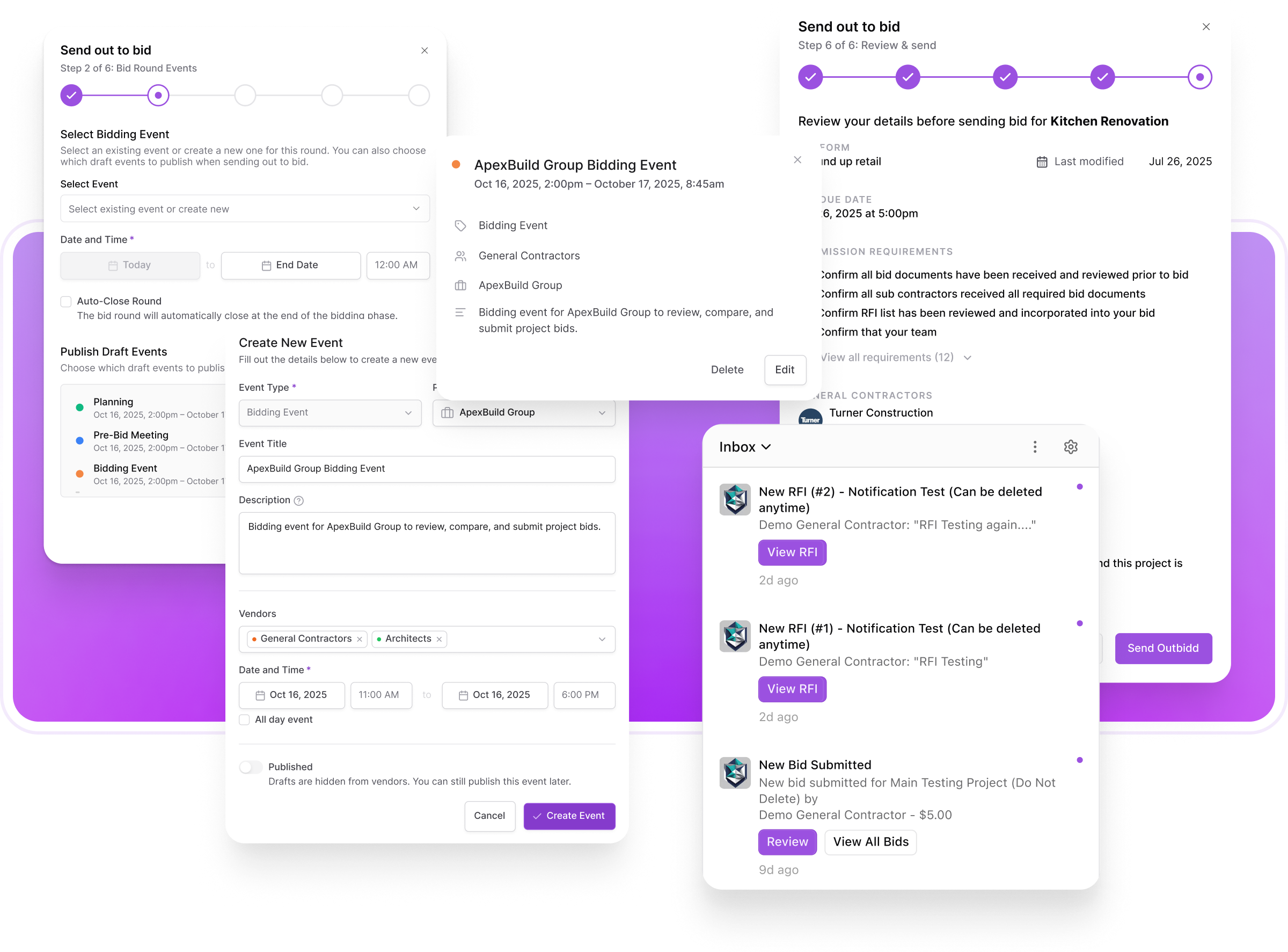
The Little Things That Make a Big Difference
Sometimes the best updates aren't flashy new features—they're the refinements that make your daily workflow just a little bit smoother. This round of improvements focused on polish, precision, and fixing those small annoyances that add up over time.
What's New:
Calendar & Event Management Gets Smarter
Your project calendar just became a lot more powerful. Here's what changed:
Draft Events — Not ready to share that next round bid deadline with contractors yet? No problem. Create draft events that only your team can see, then publish them when you're ready. Perfect for planning ahead without showing your cards too early.
Vendor Selection — Choose exactly who sees what. Now you can specify which vendors have access to specific events on the calendar. No more shared information for for contractors who won't be involved.
Point-in-Time Events — Bids are now due at specific times (like 5:00 PM), not just before the day ends. Because 5:00 PM and 11:59 PM are very different deadlines.
Auto-Close Bid Rounds — You can now select to automatically close a bid round when the clock strikes your deadline. No more late submissions sneaking in because someone claimed they didn't see the time.
Notification Center Refresh
We rebuilt our notification system from the ground up with capabilities that better match how you work:
Notification Controls — Toggle specific notifications on or off based on what you actually want to know
Email Preferences — Separate controls for in-app vs. email notifications
Archive Function — Clear out notifications you've addressed without losing the history
Fresh Design — Cleaner, easier to scan, and better organized
Send Out to Bid Flow Improvements
Making it easier to manage multiple bid rounds:
- Simplified event closing process
- Better connection between bid due dates and specific bidding rounds
- Clearer workflow for projects with multiple rounds
File Preview Enhancement
Small change, big impact: We added a darker border around the file preview instead of just the blur effect. Turns out it's a lot easier to review documents and photos when you can actually see them clearly. Revolutionary, we know.
Bid Leveling Sheet Auto-Sort
Here's a smart one: When you level a line item and it changes a bidder's total cost, the bid leveling sheet now automatically re-sorts to keep bidders in order from lowest to highest. No more mental math trying to figure out who's actually winning after adjustments.
Bug Fixes
We squashed some bugs that were causing unnecessary friction:
Calendar Date Limitation — Fixed an issue where the calendar refused to acknowledge that time exists beyond 2026. We've now confirmed that 2027 is, in fact, coming.
Checkbox Alignment — Those slightly-off-center checkboxes in the send out to bid flow? Fixed. Alignment matters, even in the small things.
Dashboard Display — Project names now show up next to RFIs on the dashboard. Seems obvious in hindsight.
Bid Submission Visibility — All GCs who accepted your project now appear in the Bid Submissions tray on the project overview page. Allows you to see everyone who has accessed the documents if they haven't submitted a bid yet.
Real-Time Leveling Updates — Fixed a timing issue where leveling individual cells wouldn't update totals immediately. The numbers now change in real-time instead of requiring a refresh. As they should.
Why This Matters
These updates might not make headlines, but they're exactly the kind of refinements that save time and reduce friction in your daily workflow. A few seconds saved here, a moment of confusion eliminated there—it adds up fast when you're managing multiple projects.
Many of these improvements also lay the groundwork for bigger features we're building. Consider this the foundation work that makes the next wave of innovation possible.
As always, if you spot something that could work better or have ideas for improvements, we're listening. Keep the feedback coming.
Questions about these updates? Reach out to our support team. We're always here to help.
Version 1.0.0
September 24, 2025
.png)
After months of beta testing, user feedback, and relentless refinement, we're officially launching Outbidd 1.0. This isn't just another construction software release—it's the end of the bid management mess. While the industry has been stuck with spreadsheets, email chains, and manual analysis for decades, we've built the platform that finally treats bid management like the sophisticated process it deserves to be.
The Complete Bid Management Revolution
Version 1.0 represents everything we've learned from beta users who've processed millions of dollars in construction bids through our platform. Every feature has been battle-tested by real construction managers, developers, and owners dealing with real projects, real deadlines, and real budget pressures. This is construction bidding, reimagined from the ground up.
Smart Project Setup That Actually Works
Create projects with timelines, documents, and requirements in minutes, not hours. No more rebuilding the same project structure repeatedly—our intelligent setup gets you from "new project" to "ready for bid" faster than it used to take just to organize your first email to contractors. Because time spent on setup is time not spent on analysis.
Multi-Round Bidding: Track Your Project's Complete Evolution
Your pricing story doesn't start and end with one bid. Track schematic design numbers, design development pricing, and final construction bids all in one place. See how Contractor A's electrical estimate evolved from $75K at 50% drawings to $110K at CDs—and understand whether that's scope growth, design changes, or just reality setting in. Stop managing separate spreadsheets for each design phase.
Bid Form Templates: Build Once, Use Forever
Your 15th retail store shouldn't require rebuilding the same bid structure from scratch. Save your "Warehouse Buildout," "High-End Retail," and "Apartment Complex" templates complete with the cost codes you always use, the alternates you typically price, and the breakout costs you want. Deploy them across projects and bidding rounds. Work smarter, not harder.
AI-Powered Analysis That Changes Everything
Our AI doesn't just spot high and low numbers—it reads every contractor's bid descriptions to generate executive-ready summaries you can copy and share when stakeholders ask "how's the bidding going?" Get instant overviews of who came in high, who came in low, what the biggest cost drivers are, and where the significant variances lie. Your analysis meetings just got a lot more impressive.
Scope Gap Detection Before It's Expensive
The AI compares bid descriptions across all contractors to identify potential scope gaps—those expensive surprises that become change orders later. When four contractors include sitework and one doesn't mention it, you'll know immediately. When someone's concrete bid is 40% lower and their description reveals they excluded footings, the system flags it. Catch scope gaps during bidding, not during construction when they cost 3x to fix.
Intelligent Variance Detection
Beyond simple high/low color coding, the system identifies which line items deserve your attention based on both percentage differences and absolute dollar amounts. A 50% variance on a $5K line item gets different treatment than a 10% variance on a $500K line item. Focus your energy where the money actually lives.
Alternates & Breakout Costs That Make Sense
Create custom line items including proper formatting for alternates (add/deducts) and breakout costs that sit outside the base bid. Want to see how adding that upgraded HVAC system affects each contractor's total? Just toggle it on. Real-time calculations mean you can test different scenarios instantly.
Professional File Management
Stop the download dance. View photos, bid documents, schedules, plans, and specs directly within the platform. Upload, organize, share, and preview everything contractors need—and everything you need to review—without cluttering your desktop or hunting through email attachments.
Standardized Contractor Experience
Contractors get a professional portal where they can review project details, download documents, submit RFIs, and upload structured bids. No more messy spreadsheets in different formats from every GC. No more hunting through various bid layouts to find comparable numbers. Every bid comes in clean, organized, and instantly comparable.
Real-Time Collaboration Tools
Leave comments directly on specific line items. Track decisions. Keep the entire conversation right where the data lives instead of scattered across email chains, teams messages, and texts. When someone asks "why did we go with Contractor X," the answer is right there in the platform.
The End of Bid Management Chaos
While your competitors are still building new bid forms for every project, managing separate spreadsheets for each design phase, manually comparing inconsistent contractor submissions, and hoping they caught all the scope gaps, you've got a complete platform that handles it all.
What This Means for Your Projects
- Reduction in RFP Management time through complete RFP control
- Reduction in bid review time through standardized submissions and AI analysis
- Complete project pricing evolution tracked from first budget to final award
- Scope gaps caught early when they're questions, not expensive change orders
- Professional stakeholder communication with instant executive summaries
- Team alignment with integrated collaboration tools
- Contractor relationships strengthened through professional, streamlined processes
Version 1.0 isn't just better bidding software—it's the platform that finally makes bid management as sophisticated as the projects you're managing. From boutique construction management firms to billion dollar developers, the industry's most demanding users have proven it works.
Welcome to the future of construction bid management.
This is better bidding.
BETA 0.4.0
September 19, 2025
.png)
We're bringing artificial intelligence to construction bid analysis—and it's about time. Here's the reality: You notice when someone's $50K lower on concrete, but do you see that they are missing the new sidewalks around the the building when the other guys included them? Welcome to Beta 0.4.0, where AI does the heavy lifting your brain can't.
AI Bid Insights & Summary:
Your Executive Summary, Instantly.
Stop scrambling for answers when your boss asks "How's the bidding going?" Our AI generates an immediate bid round summary that updates in real time as new bids come in. Get instant overviews of who came in high, who came in low, what the biggest cost drivers are, and where the significant variances lie. It's the perfect summary you can copy, paste, and share with stakeholders who want a quick picture without diving into spreadsheets. Your "how are we looking?" meetings just got a lot easier.
AI Scope Gap Detection:
Find What's Missing Before It's Too Late.
Here's where it gets serious. Our AI compares bid descriptions across all contractors to identify potential scope gaps—those expensive surprises that become change orders later. When four contractors include sitework and one doesn't mention it, you'll know immediately. When someone's concrete bid is 40% lower and their description reveals they excluded footings, the AI flags it. No more discovering scope gaps during construction when it costs 3x to fix them.
Automatic Variance Detection:
Smart Analysis, Not Just Color Coding
We've taken variance detection beyond simple high/low highlighting. The system now identifies which line items deserve your attention based on both percentage differences and absolute dollar amounts. A 50% variance on a $5K line item gets different treatment than a 10% variance on a $500K line item. Focus your energy where the money actually lives.
File Preview:
Stop the Download Dance
Gone are the days of downloading every file just to see what's inside. View photos, bid documents, schedules, plans, specs, and more directly within the platform. No more cluttering your desktop with "temp" folders or waiting for massive PDF downloads just to check one detail. Click, preview, done. Your file management just got infinitely cleaner.
The Intelligence Behind Better Decisions
While your competitors are still manually comparing spreadsheets and hoping they caught everything important, you've got AI working through every detail. Every line item. Every description. Every potential gap. Your bid analysis just got smarter, faster, and more thorough than any human review could be.
The Bottom Line
Construction projects are complex. Contractor bids are complicated. Scope gaps are expensive. Human attention is limited. AI attention isn't. Beta 0.4.0 gives you the analytical superpower to make better contractor selections based on complete information, not just the obvious numbers.
This is better bidding.
BETA 0.3.0
September 11, 2025
.png)
We're moving fast and on a mission. Here's a question: You get pricing at schematic design, then again at design development, then final bids on the construction set. Where do you keep track of it all? Three different spreadsheets? Five different email chains? That folder on your desktop called "Project X - Final Final REAL Final"? Welcome to Beta 0.3.0, where we've solved the multi-phase pricing nightmare.
Multi-Round Bidding: Track Your Project's Evolution
Now you can run multiple bidding rounds for the same project as your drawings evolve. Schematic pricing in Round 1, design development numbers in Round 2, construction set bids in Round 3—all living in the same project, all easily comparable. No more hunting through old spreadsheets to remember what Contractor A bid six months ago at 50% drawings. No more losing track of how pricing evolved as the design got more detailed. Everything lives in one place, organized by round, ready for instant comparison.
Bid Form Templates: Build Once, Use Forever
Here's where efficiency gets real. Building your 15th retail store? Your 8th warehouse? Your 20th apartment complex? Your bid form templates now work across projects AND rounds. Create your "Retail Store Buildout" template once—complete with the cost codes you always use, the alternates you typically price, the breakout costs you want. Then deploy it on every similar project. No more rebuilding the same bid structure over and over. Your "Schematic Pricing" template asks different questions than your "Final Bid" template, and your "Warehouse" template looks nothing like your "High-End Retail" template. Save them all, use them everywhere.
See How Numbers Actually Change
Flip between bidding rounds instantly to see how Contractor B's electrical estimate went from $75K at SD set to $95K at DD set to $110K at CDs set. Was it scope creep? Design changes? Or did they just get more realistic as details emerged?
Mid-Round Flexibility for Evolving Projects
Architect just issued an addendum? Now you can add new submission questions to your active round. All bidders get updated requirements without you having to start over or send confusing email updates or ask the question when the bids come in.
Bid Round Management That Makes Sense
Close rounds as each design phase completes
Reopen for specific GCs who need to address a specific issue without reopening for everyone
Keep contractors across multiple rounds if your happy with their numbers or test new ones every round
Work on your next bid form while current round pricing is still coming in
Stop Rebuilding What You've Already Built
Beta 0.3.0 acknowledges two realities: construction pricing is a journey, not a destination, AND most Owners/CMs work on similar project types repeatedly. Your templates should work as hard as you do. Your bidding platform should evolve with your project—and remember your preferences for next time.
The Bottom Line
While your competitors are still building new bid forms for every project and managing separate spreadsheets for each design phase, you've got templates that scale and a complete pricing evolution story. From first budget to final award, all in one place, all instantly comparable. Because the real question isn't just "What did they bid?" It's "How did we get here, and what changed along the way?"
This is better bidding.
BETA 0.2.0
August 20, 2025
.png)
We're serious about building the pre-construction platform that construction managers, developers, and owners actually want to use. Just 2.5 weeks after our initial beta launch, we are excited to push out Beta 0.2.0 with all new features to improve the platform.
Features included in Beta 0.2.0:
1. Alternates & Breakout Costs
Tired of being locked into rigid CSI cost codes? So were we. Now you can create custom line items—including proper formatting for alternates (add/deducts) and breakout costs. Heres the game changer: These items sit outside the base bid, giving you the granular details you need without cluttering the main numbers. Want to see how adding that upgraded HVAC system affects each contractor's total? Just toggle it on. Real-time calculations mean you can test different scenarios instantly, not after hours in a spreadsheet.
2. Bid Review Page Revamp
Our initial Beta bid review was functional. Beta 0.2.0's version is transformational. We didn't just improve it—we reimagined what bid comparison should look like:
Smart Color Coding: High and low line items are instantly visible. No more squinting at numbers to spot the patterns.
Automatic Variance Detection: Set your sensitivity (10%, 15%, 20%, 25%+) and watch outliers jump off the page. That electrical bid that's suspiciously low? You'll spot it immediately.
Dynamic Column Control: Hide contractors who aren't in the running. Focus on your top choices. Compare however makes sense for your decision-making process.The best part? Everything updates in real time. Change an alternate, adjust a line item, hide a column—the entire analysis adapts instantly.
Team Collaboration: Leave comments directly on specific line items on bid review page. No more "Hey, did you notice..." Team's messages or email chains about why contractor X's plumbing number seems off. Keep the conversation right where the data lives.
BETA 0.1.0
August 1, 2025
.png)
🚀 Launching Outbidd Beta
Welcome to the future of construction bid management. After months of development and testing, we're excited to introduce the first platform built specifically for construction managers and developers to secure the best bids for their projects.
Features included in this beta:
1. Smart Project Setup - Create projects with timelines, documents, and requirements in minutes
2. Contractor Management - Build your database and send professional RFPs to your network in minutes instead of days
3. Standarized Bid Format - Standardized format for GC to upload their bids. No more messy spreadsheets and various bid forms
4. RFI Management - Clearly see all RFIs and responses to ensure all bidders have all the information they need
5. File Management - Add, Remove, Share, and Export all project files and photos. Ensuring all bidders have access to all necessary files
6. Real-time Analysis - Color-coded comparisons, variance detection, and scope gap identification
7. Professional Exports - Easy exporting for RFIs, Bid Documents, and Photos to help you create professional client reports
8. Team Collaboration - Keep everyone aligned with integrated notes and team member collaboration
Transform your project with complete bid management & financial oversight
.png)
Budget. Bid. Build.
Get in touch
.svg)
.svg)